Expanding on my short post this morning about AI-assisted coding style, I think the reason I like this iterative approach is that I don’t always know what I want the UI to look like until I build it. UI design is a bit like sculpting, slowly revealing the shape of everything.
This may also be a difference in style between Claude Code and Codex, where Claude prefers to come up with a plan first, and Codex is fine just running with small instructions and figuring out the details as it goes.
Here’s a transcript of my interaction with Codex for adding podcast playback to Inkwell for Mac. I’m just including my own text, not all the logging from Codex. Maybe someone will find it interesting! Years from now I can look back and marvel at how primitive this will seem.
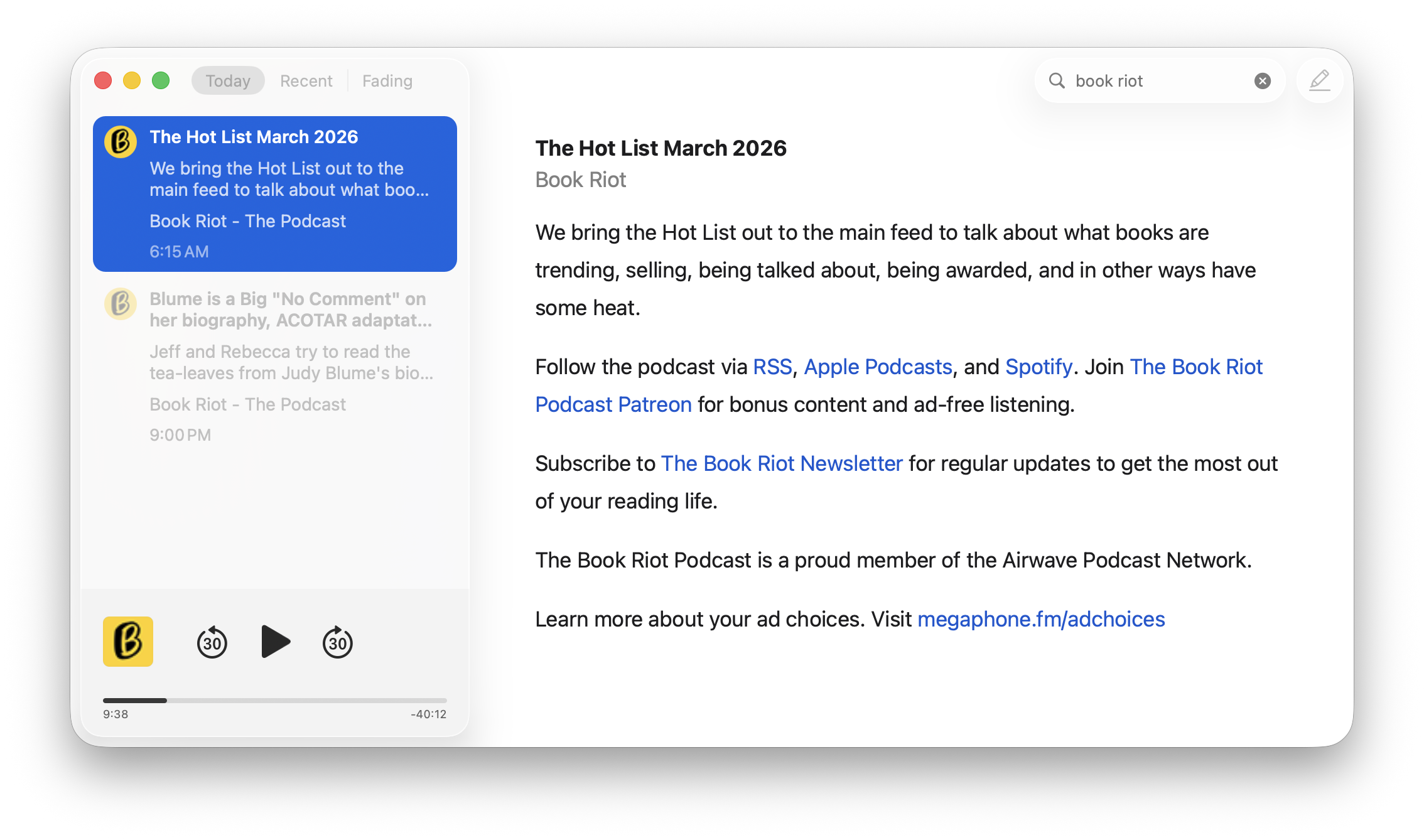
Here’s a screenshot of the current in-progress UI. The feature is not done. I plan to fill in the space on the right of the podcast pane with playback speed, add better download caching, and whatever else makes sense.
Let's add a new major feature: podcast playback. When requesting entries.json, add mode=extended which will include more JSON data like this example item:
[JSON clipped]
Notice the "enclosure" field with "enclosure_url" and "itunes_duration". We'll want to add these to our model.
Next, we want to add a new player pane at the bottom of the sidebar, below the tableview. For now, it will be hidden by default. If the selected sidebar item has an enclosure, we show the new player pane. Give the new player its own view controller like MBPodcastController which you can wire up as necessary where it needs to be instantiated and called. As a placeholder, just have an orange background and a button centered with an image "play.fill". We'll add more later. Also keep tracking of whether a podcast is playing. If playing, we change the image to "stop.fill". Also if playing, we keep the podcast pane shown below the tableview. If the podcast is not playing, then when the selection changes in the tableview to another row, we hide the player pane.
-- Worked for 6m 45s --
Let's update hasEnclosure to actually only return YES for audio enclosures. Rename it hasAudioEnclosure. Let's also keep track of the JSON field:
"enclosure_type": "audio/mpeg",
And use enclosure_type == "audio/mpeg" to mean audio podcast enclosures, returning YES there.
-- Worked for 48s --
In the podcast pane, change "stop" to "pause.fill". Set these buttons to not have a border. Also add a button to the left and to the right of play/pause for skipping back and forward. Use image names: "30.arrow.trianglehead.counterclockwise" and "30.arrow.trianglehead.clockwise". We also want a custom slider beneath the buttons that we will use to scrub through the episode and show playback progress.
-- Worked for 1m 43s --
On the left side of the podcast pane (see mockup where I put a black square) let's add the avatar image for the site. Use rounded corners 5px. If the avatar can't be loaded, just use a gray background. Also let's change the placeholder orange background color to a semi-transparent light gray.
-- Worked for 1m 38s --
Not quite right. We still want the buttons centered horizontally and the slider centered. The avatar should be off on its own on the left.
-- Worked for 31s --
Let's make the avatar square a little smaller. Also, can we customize the slider so there is no visible thumb?
-- Worked for 15s --
It's time to wire up playback. Let's use AVPlayer (AVFoundation) to instantiate the podcast from the enclosure URL. When the user clicks play, we'll play, pause, etc. Update the slider % with the playback progress. Wire up the left rewind button and right forward buttons to go 30 seconds back or forward. When we get to the end of playback, set the playback to paused.
-- Worked for 1m 14s --
When the slider changes, we should also scrub through the podcast playback.
-- Worked for 28s --
Are you sure the slider is working? Please check again.
-- Worked for 1m 54s --
Good. Also can you change background color to use the color named "color_podcast_background"
-- Worked for 23s --
Let's keep track of playback position in a new file in Application Support. Call it Podcasts.json. It should be a JSON array with each item having fields for feed ID, enclosure URL, playback_seconds, playback_percent (float 0...1), last played date. We keep this array in memory in the app and when the selection changes, we update it. That way if someone selects a different post and then comes back to the podcast, we can restore the playback position correctly. Set a timer during playback that updates the file on disk every 15 seconds. When we're writing out the new file, sort by last played date with most recent first, then truncate the array so it's only the most recent 50 items, so the array on disk never gets too large.
-- Worked for 5m --
This is great. One change: when we show the podcast player, update the slider to the saved position right away, don't wait until the user clicks play.
-- Worked for 35s --
Still not right. Do we need to call setNeedsDisplay? Visually the slider is not updating when the podcast pane is shown, until the user clicks play, and then it's correct. We want to visually update the slider right away even while paused.
-- Worked for 38s --
Not sure why I said to save feed_id. We mean entry_id so that each podcast episode (blog post) is tracked.
-- Worked for 47s --
I figured out the playback restore position problem. After we set the position, updateProgressSliderForCurrentTime is called and resets it back to 0.
-- Worked for 27s --
Now let's add the current playback time and the remaining time. We want to use hours:minutes:seconds. Add two text label fields: very small text label on the left directly underneath the slider for current time, and a label on the right for time remaining. Time remaining should have "-" before it. Move the slider up 10px or so to make room.
-- Worked for 1m 36s --
Move the new fields up about 5px. Also if there are no hours, leave it off. If the minutes are single digit, leave off the extra 0. In other words we want 1:23 for 1 minute 23 seconds, not 0:01:23 and not 01:23. Apply this formatting change to both current time and time remaining. Also update the time labels live as we're scrubbing through the slider.
-- Worked for 41s --
Good but slider still isn't live. Check if slider.continuous is set correctly.
-- Worked for 16s --
I think I found the problem. updateProgressSliderForCurrentTime is bailing right away when isScrubbing is true. Let's take a step back and rethink this flow with scrubbing. It's okay if we don't set the AVPlayer position until after scrubbing is finished, but we still need the live time labels update as the user is dragging.
-- Worked for 33s --
There's obviously a lag when first starting a podcast as AVPlayer loads the audio file. During this time, let's add a progress spinner to the right of the pane (so it mirrors the avatar icon) and start animating it while the audio file loads, then hide it. We can use player.status == ReadyToPlay to judge when to hide progress.
-- Worked for 1m 18s --
Progress spinner is way too big. Make it default small size. Doesn't need to match avatar square size.
-- Worked for 18s --
Something is still amiss with live tracking. I've debugged and the action scrubPlaybackPosition is not being called at all. Please double-check this, also check trackingStateChangedHandler and related callbacks.
-- Worked for 47s --
We've still got problems and it's our custom cell. Let's implement continueTracking:at:inView and stopTracking for our custom cell. Make sure that those fire the action. Also let's refactor MBPodcastSlider into its own file. It's okay if the cell class is in the file too with MBPodcastSlider.
-- Worked for 1m 22s --